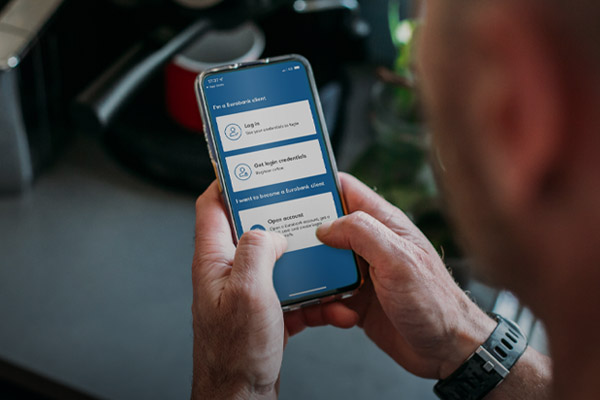
Open a Day to Day Account for your banking transactions from your mobile, through the Eurobank Mobile App Digital Customer Onboarding service, without coming to a branch. Easily upload all required documents and contact one of our representatives via video conferencing. Get login credentials for e-Banking and the Eurobank Mobile App, and your virtual debit card. You can apply for an account online, if you have 1 or more tax residences.
Open an account through the Eurobank Mobile App by 31.12.2026 and you’ll earn:
- 40 €pistrofi euros, if you are 18-25 years old, using the code WELCOME40EUROS.
- 25 €pistrofi euros, if you are 26+ years old, using the code WELCOME25EUROS.
Read the terms and conditions of the offer (available only in Greek).
Download the Eurobank Mobile App on your mobile for free:


Through the Eurobank Mobile App
Download the Eurobank Mobile App on your mobile for free:


Open the app to sign up. Your screen displays your available options.
If you do not bank with Eurobank, to open an account for your day-to-day transactions:
- Choose: Open an account
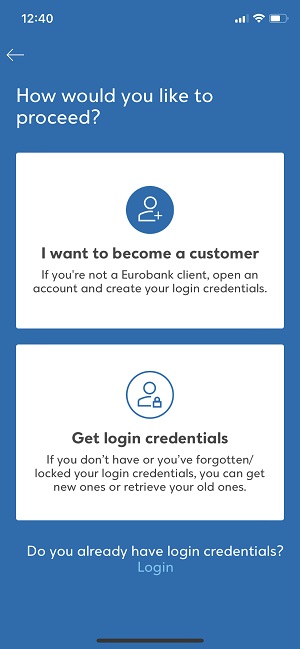
You will need just a few minutes to complete your application. You do not have to come to a branch.
To be able to monitor the progress of your application, you need to allow the app to send you notifications.
If you fail to do so at the time, you may turn them on later through your phone Settings.
To open an account online through Digital Onboarding, you must:
- Be a permanent resident in a country participating in PRADO.
- Work in a country participating in PRADO.
- Have an ID or passport issued by a country participating in PRADO.
Choose your country of residence
To open an account, you start by choosing the country where you live permanently. This must also be your primary tax residence.
Fill out your mobile number
The second step to opening an account is to fill out your mobile number.
To verify it, you enter the One-Time Passcode (OTP) you receive via SMS.
Add more tax residences if necessary
If you have additional tax residences, choose NO when asked if the country you chose earlier is your sole tax residence. Then, choose another country from the list. If you:
- Have a tax number in that country, choose YES and enter it.
- Don’t have a tax number in that country, choose NO and the reason why.
You can register up to 3 tax residences in total.
Upload the supporting documents
The next step is to submit all supporting documents required. You must upload the original documents or clear photos, but not screenshots:
- For proof of identity – take a headshot on the spot and a photo of your valid passport or other document proving your identity.
- For your income and profession – choose your professional status, i.e. salaried employee, self-employed, student, etc. and upload the supporting documents verifying your income and capacity.
- For your tax number – if your tax number is not shown on your proof of identity, upload a document proving your tax number in the country of your primary tax residence.
- For your home address – register your address and upload a document proving it.
Once you submit all required documents, wait for 5 minutes for us to check them. If necessary, we may ask you to resubmit some of them.
Find out the supporting documents required for your application.
One of our representatives contacts you
Once we check your supporting documents, we contact you by video call to verify your personal details. Keep the app open while we check your documents. If you close the app before the video call starts, you will have to start over.
The video call takes about 3 minutes. Just before it starts, you receive a notification. The camera turns on automatically to talk to our representative.
Get your login credentials
Once the video call is concluded, you get issued with login credentials for e-Banking and the Eurobank Mobile App.
Choose the Username and the Password you want.
Choose how you wish to bank with us
To complete your application, read and accept the terms and the pre-contractual information document for your account.
Your account and debit card number appear in the terms, which you have accepted.
To better serve you with products and services that meet your needs, you also need to answer a few questions about:
- Your financial profile.
- The transactions you wish to carry out through us.
Once you have answered these questions, your application is completed.
Get updated by SMS
Regarding the outcome of your application, you get updated by SMS on the mobile you have registered.
You receive the SMS within 15 minutes to 2 days following your application. Provided we approve it:
Proof of identity
Take a photo of and submit your valid passport to prove your identity.
If you have no valid passport, take a photo of and submit your ID card (front and back).
Proof of income and tax details
Upload a pdf file or a photo of the income tax return statement (latest), issued by the tax authority of your country of residence.
Proof of employment
Upload a pdf file or a photo of the supporting documents for your profession.
If you are a salaried employee, a certificate from your employer, your most recent payslip, a certificate issued by the competent social insurance fund or any other official document proving your professional status.
If you serve in law enforcement or the armed forces, your uniformed services ID card or any other official document proving your professional status, as well as your most recent payslip.
If you are a freelance professional or farmer, a document certifying your profession, such as:
- A certificate issued by the competent social insurance fund proving your professional capacity (issued within the past 3 months).
- Any other official document proving your professional capacity.
If you are a student, your student ID or any other official document proving your student capacity.
If you are a pensioner, your most recent pension slip, a certificate issued by the competent social insurance fund or any other official document proving your professional capacity.
If you are unemployed, an official document proving your professional status.
Proof of home address
You should submit a recent utility bill or a mobile phone bill (issued within the past 6 months).
The Day to Day Account allows you to easily:
- Make payments, transfer cash and shop by directly debiting your account.
- Monitor its activity on your computer or mobile.
Using your card
Once you open your account, you have access to the card details and you can use it immediately. You do not need to activate it.
Find out how your day-to-day life gets easier with the Hybrid Debit Mastercard.
€pistrofi loyalty programme
Your debit card is linked to the €pistrofi loyalty programme. You don’t need to register for it.
Use it to earn and redeem cashback rewards through transactions at any partner company in Greece.
To open your account as fast as possible, make sure to:
- Upload the original documents or clear photos of your supporting documents, but not screenshots. If we cannot read them, you will have to repeat the process.
- Keep the app open while we check your documents (max 5 minutes). If you close the app before the video call starts, you will have to start over.
To open your account as fast as possible, make sure to:
- Upload the original documents or clear photos of your supporting documents, but not screenshots. If we cannot read them, you will have to repeat the process.
- Keep the app open while we check your documents (max 5 minutes). If you close the app before the video call starts, you will have to start over.
No, you can’t.
To open another account or apply for other banking products, call EuroPhone International Banking on +302109555345.